


Hours Tracker Time Tracking
3.62.14K Reviews
App Specs
- Version
- 5.0.14
- Updated On
- License
- Free
- Downloads
- 1,000,000+
- Developer
- cribasoft, LLC
- Categories
- Business
- Platform
- Android
Screenshots
 Analysis by AppCompare
When I want a clearer picture of a workday, I’d rather jot down time as it happens than reconstruct a week from memory. Hours Tracker: Time Tracking is built around that practical need: it helps hourly workers, contractors, and freelancers keep tabs on working time and pay without turning the process into a full business-management project. I see its appeal in the routine it encourages: start tracking, connect the time to a job, then review what the hours add up to.
That focused approach matters if you simply need a personal record of shifts or billable work. It also sets expectations: this is a time-and-pay tracker, not a replacement for a complete invoicing, payroll, or team-management system. I’d consider it when the main problem is remembering and organizing hours, and look elsewhere if I need a larger workflow built around those records.
What the free access does—and doesn’t tell you
The app is free to download, with in-app purchases listed from $2.99 to $47.99 per item. That gives you a useful starting point for trying the basic experience, but I wouldn’t assume that every feature is included at no cost or that a particular purchase is necessary. The sensible move is to use the free access for your actual routine first, then check the available purchase details in the app before paying.
For a worker who only wants to record shifts, free access may be enough to judge whether the tracking habit sticks. A freelancer handling several types of work may value the app differently if a paid option supports the workflow they need. Since those needs vary, the price range alone doesn’t tell me whether an upgrade is worthwhile; the value depends on what the specific purchase unlocks and how often I’d use it.
Where the value comes from in a normal week
The strongest case for using a dedicated tracker is not that it magically makes a day more productive. It’s that a record made close to the work is usually more useful than a guess entered days later. If I move between a client task, a paid shift, and a short piece of contract work, separating those blocks gives me a better basis for checking hours and pay than one running total in a notes app.
That can be especially helpful when a week is irregular. Instead of relying on memory at the end of a busy Friday, I can review the time I logged and spot a missing shift or a task that ran longer than expected. The app’s focus on both time and hourly pay is relevant here: it connects the effort recorded with the amount I expect to earn, making the record more practical than a timer that only shows elapsed minutes.
Tradeoffs to consider before relying on it
A timer only helps when I use it consistently. If I forget to start or stop it, I still have to repair the record, and a manually corrected entry depends on my memory. I’d make a habit of checking the day’s entries before finishing work rather than treating the app as an automatic timesheet. For anyone with strict billing or payroll rules, I’d also compare its records with the employer’s or client’s required process instead of assuming a personal tracker is the official source.
Worth Reading Before You Choose

EA SPORTS FC Mobile 26 Is a Bigger Football Game, but It Takes Time

Flipboard Shows What News Apps Must Do Beyond the Feed

Switching to Android Auto Means Rethinking Your Driving Routine

Google Calendar Makes a Crowded Week Easier to Manage

Ludo King Makes the Most of the Minutes Between Plans

Baby Panda World Brings Quick Play to Modern Phones, but Its Game Library Feels Busy
There is also a difference between tracking time and managing a business. People who need a full invoicing system, expense tracking, approvals, or shared team timesheets should compare dedicated tools for those jobs. Hours Tracker makes more sense when I want a straightforward personal log and don’t want the overhead of adopting a broad platform just to record hours.
Who is most likely to get value
I’d point hourly workers with changing shifts, independent contractors, and freelancers toward it first. Someone who works a regular schedule and never needs to verify hours may get little from any separate tracker. But if your week changes often, if you divide work among clients, or if you want a clearer personal record of time and estimated pay, a small logging habit can make the app useful without demanding a complicated setup.
A realistic routine might look like this: I finish a morning assignment, stop its timer, and start a separate entry when I move to another client’s work. Before closing the app for the day, I check that the two blocks are assigned to the right work and that I didn’t leave a timer running over lunch. That quick review is more valuable than waiting until invoice preparation to piece the day back together.
Getting Started with Hours Tracker
The first thing you'll notice when you download Hours Tracker: Time Tracking is its user-friendly interface. Setting up is a breeze. You just need to create a project, set your hourly rate if you're into freelancing, and you're good to go. The app is available for both Android and iOS, so it fits right into your pocket, no matter what device you're using.
Interface and Usability
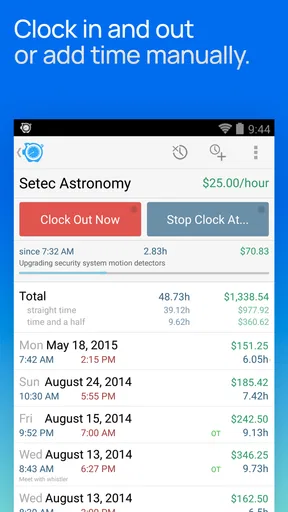
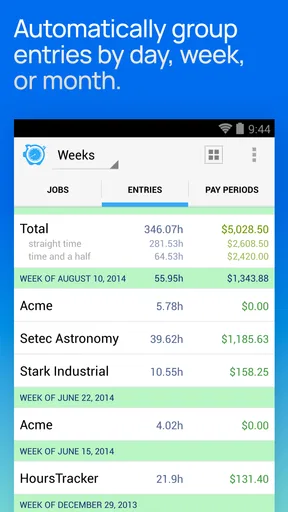
The app's design is minimalistic, which I absolutely love. It's not cluttered with unnecessary features, making it super easy to navigate. The dashboard gives you a quick overview of all your projects, total hours worked, and earnings. I found that I could access all the important features with just a few taps.
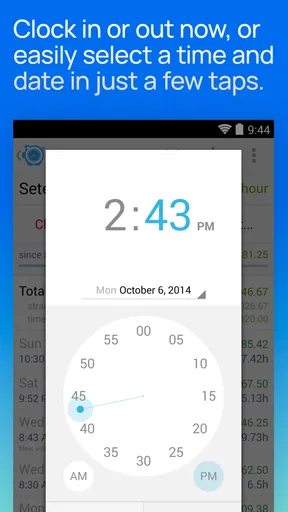
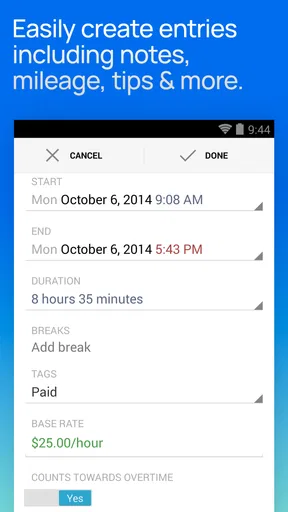
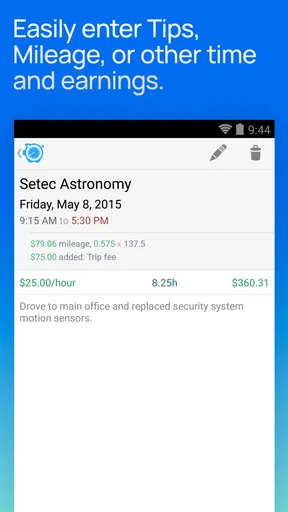
One nifty feature is the ability to customize your work schedule. You can set up notifications to remind you to clock in or out, which is perfect if you're as forgetful as I am. Plus, the app allows manual time entry, so if you ever forget to start the timer, you can easily add your hours later.
Tracking Your Time Effectively
What makes Hours Tracker stand out is its precise time tracking capabilities. You can start and stop the timer with just a tap, and the app does the rest. I love how it breaks down your time into different projects or tasks, which helps me see where I’m spending most of my time. It's like having a little productivity coach in your pocket.
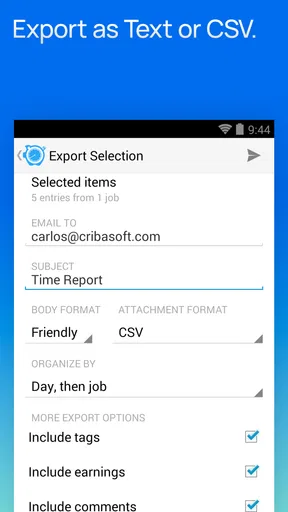
For those who work with clients, the app also provides detailed reports. You can export these as CSV files, making invoicing a whole lot easier. Trust me, it saves a ton of time and hassle.
Seamless Integration and Versatility
Hours Tracker isn’t just about tracking time; it’s about integrating seamlessly with your lifestyle. Whether you’re working from a cozy coffee shop or a bustling office, the app syncs across all your devices. It's compatible with Google Calendar, which means you can easily plan your weeks and track your progress in one place.
- Integrations:
- - Google Calendar
- - CSV exports
Another thing I appreciate is its offline capability. You can still track your time even when the internet decides to take a break. Once you're back online, it syncs effortlessly.
Why You Should Consider Using It
If you're someone who juggles multiple projects or just wants to get a grip on time management, this app is worth considering. It not only helps in tracking hours but also in boosting productivity. I found myself more aware of time spent on tasks, leading to better prioritization and less procrastination.
Besides, the app is regularly updated with new features and improvements, which shows that the developers are committed to providing a smooth user experience. Customer support is responsive, so if you run into any issues, help is just a message away.
I must say, Hours Tracker: Time Tracking has genuinely made a difference in how I manage my work day. It's efficient, straightforward, and reliable, making it a must-have tool for anyone looking to take control of their time.
So, if you're ready to transform how you track your hours, give Hours Tracker a shot. You might just find that it's exactly what you need to boost your productivity and streamline your work life.
How it compares with the usual alternatives
For a single shift, a note on my phone or a basic stopwatch can be enough. Those options are quick, but they leave me to calculate totals, remember which client each block belongs to, and connect the time to pay on my own. A spreadsheet gives more control over categories and calculations, yet it takes more effort to maintain and is easy to neglect when a workday gets hectic. Hours Tracker sits between those approaches: more structured than a note or timer, without asking me to build a tracking system from scratch.
That middle ground is also a limitation. If I need colleagues to submit hours for approval, or want a manager to oversee schedules, a personal tracker is not the same as a shared workforce tool. Likewise, someone whose main need is sending polished invoices may prefer software designed around billing. I’d choose this app for keeping my own time organized, not because it replaces every tool a small business might use.
Small habits that make the records more useful
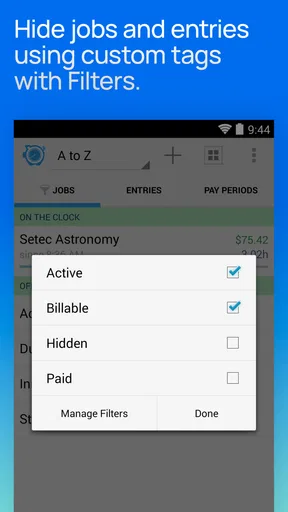
I’d set up projects in a way that makes sense when I look back later, rather than creating a new label for every tiny task. For example, a freelancer can separate client work that needs to be billed from internal admin time, while a shift worker can keep different jobs distinct. That makes a review more meaningful: the total is not just a number, but a record I can interpret without trying to remember what each entry represented.
Reminders can help establish a routine, but I wouldn’t treat them as proof that every entry is correct. A useful end-of-day check is to scan for an active timer, confirm that any manual additions cover the right period, and make sure separate pieces of work haven’t been lumped together. This is particularly worthwhile when moving between tasks quickly; the small check reduces the chance that a clean-looking weekly total is built from miscategorized time.
CSV export is most useful when I decide in advance what I’ll do with the file. A contractor can use it as a starting point for checking billable hours, while still reviewing the entries before preparing an invoice. I wouldn’t send an export to a client without checking the date range, project labels, and totals. Exporting makes records easier to carry into another workflow; it doesn’t remove the need to verify them.
Device, age, and version details in context
Hours Tracker is a business app from cribasoft, LLC. It has been available since June 23, 2013, and its current version is 5.0.12; the minimum operating-system requirement is 7.0. Those details make it worth checking compatibility on an older device before relying on it for work. The app is free to download, rated for Everyone, and has in-app purchases, so families or shared-device users can also make their own decision about whether the purchase options suit them.
Its average rating is 3.7 from around 6,400 ratings, with roughly 2,100 written reviews, and it has over one million installs. I’d treat that as context rather than a promise that it will fit every workflow. The important test is whether its way of organizing projects, time, and pay matches the records I need to keep. A popular tool can still be the wrong choice if I require formal approvals or a specialized payroll process.
My buy-or-skip verdict
I’d try Hours Tracker if I regularly work variable hours, split time between projects, or need a personal check on earnings. Its strongest value is the combination of a quick timer, manual corrections, project-level organization, and records that can be exported. Used consistently, that can make a week easier to review and help me catch gaps before they become a billing or timesheet headache.
I’d skip it if I rarely need to track time, if my employer already requires a specific official timesheet, or if I’m looking for a complete system for invoicing and team administration. The free download makes it possible to assess the fit before considering an in-app purchase, but I’d verify the exact purchase details and only pay when a feature solves a recurring problem for me. For personal work-hour tracking, it’s a practical option; for a business-wide process, I’d choose a tool built for that larger job.
Pros
- User-friendly interface for easy navigation.
- Customizable alerts for breaks and overtime.
- Supports multiple projects simultaneously.
- Detailed reporting for better insights.
- Cloud sync for data backup and access.
Cons
- Limited free version features.
- No offline tracking capabilities.
- In-app ads can be intrusive.
- Requires account for full functionality.
- Occasional sync delays with cloud.
FAQs for Hours Tracker Time Tracking
What is Hours Tracker: Time Tracking and how does it work?
Hours Tracker: Time Tracking is an app designed to help users efficiently log and manage their work hours. It allows you to track time for multiple projects, set hourly rates, and generate reports. The app provides an intuitive interface where users can start and stop a timer with ease, ensuring accurate time logging.
Is Hours Tracker compatible with both Android and iOS devices?
Yes, Hours Tracker is available for both Android and iOS platforms. This ensures that users can seamlessly track their time across multiple devices, whether they use a smartphone or tablet. The app is designed to sync data so you can access your time logs from any device.
Does Hours Tracker offer any integrations with other productivity tools?
Hours Tracker offers integrations with several popular productivity and project management tools. This allows users to streamline their workflow by connecting their time tracking data with other applications, such as calendars or task managers, enhancing overall productivity and efficiency.
Are there customization options available for different types of work schedules?
Yes, Hours Tracker provides various customization options to accommodate different work schedules. Users can set up custom hourly rates, add breaks, and categorize work by project or client. This flexibility ensures that the app can adapt to a wide range of professional needs and preferences.
What are the privacy and data security features of Hours Tracker?
Hours Tracker prioritizes user privacy and data security by implementing robust encryption methods. The app ensures that your time logs and personal data are securely stored and only accessible by you. Additionally, it offers options for regular backups so you can restore your data if needed.


